In active developmentv0.74.2 — new versions ship often. If something looks out of date, reload the page (or press Ctrl+Shift+R).

One drawing, three layers deep.

Lumistrel is intelligent P&ID software that runs in your browser. Every symbol you place becomes an engineering record, so the instrument lists, the design checks and a live operator screen all come from the one drawing.

Watch the tour

The sheets are stills from the recordings below. The light moving over them is illustration.

Draw

The P&ID sheet

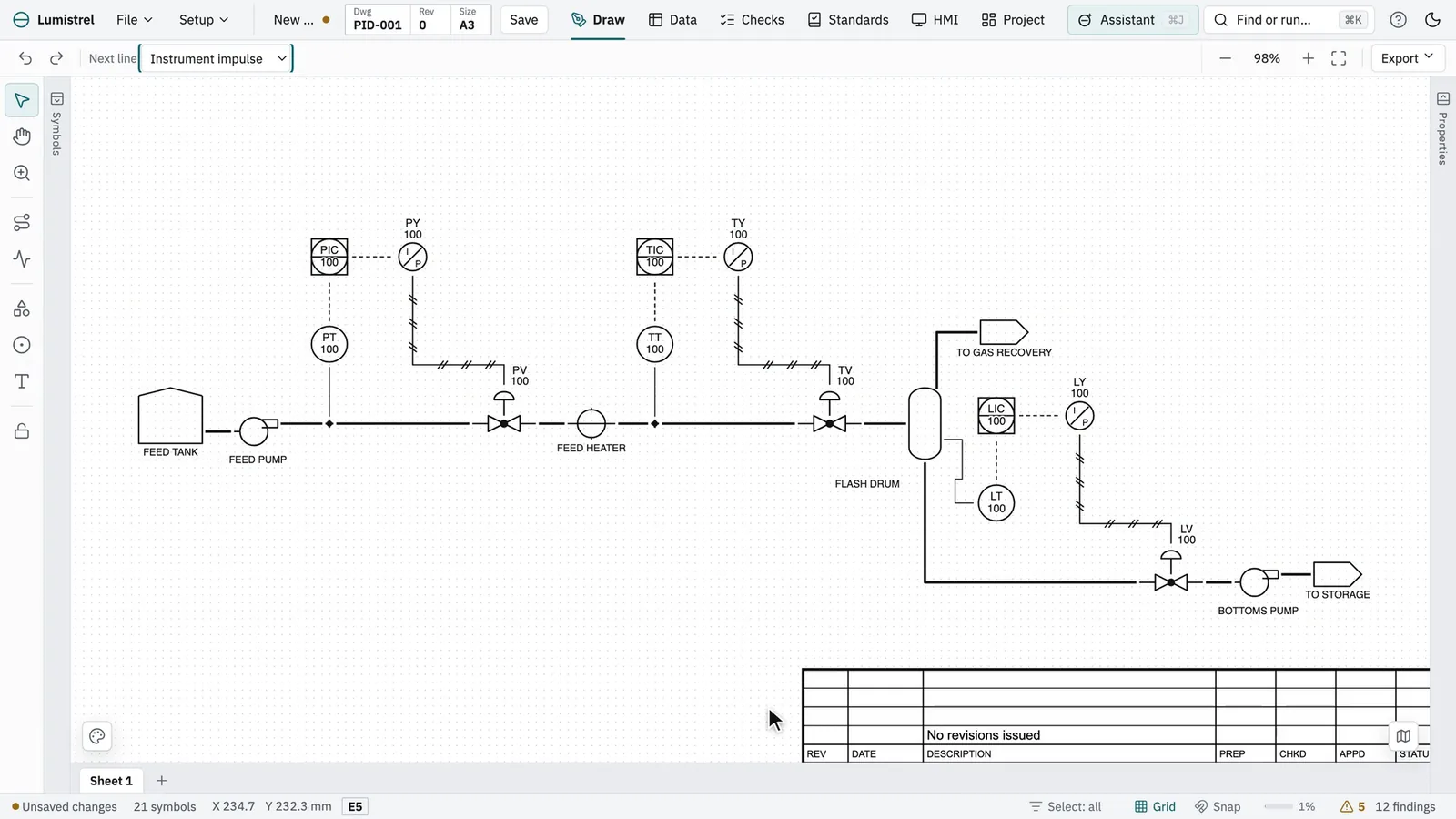
ISA-5.1 symbols, dragged from the library and connected port to port. Lines route themselves and every loop numbers itself.

P&ID symbols
195
line classes
16
The demo plant’s P&ID in the Lumistrel editor

Check

The engineering lists

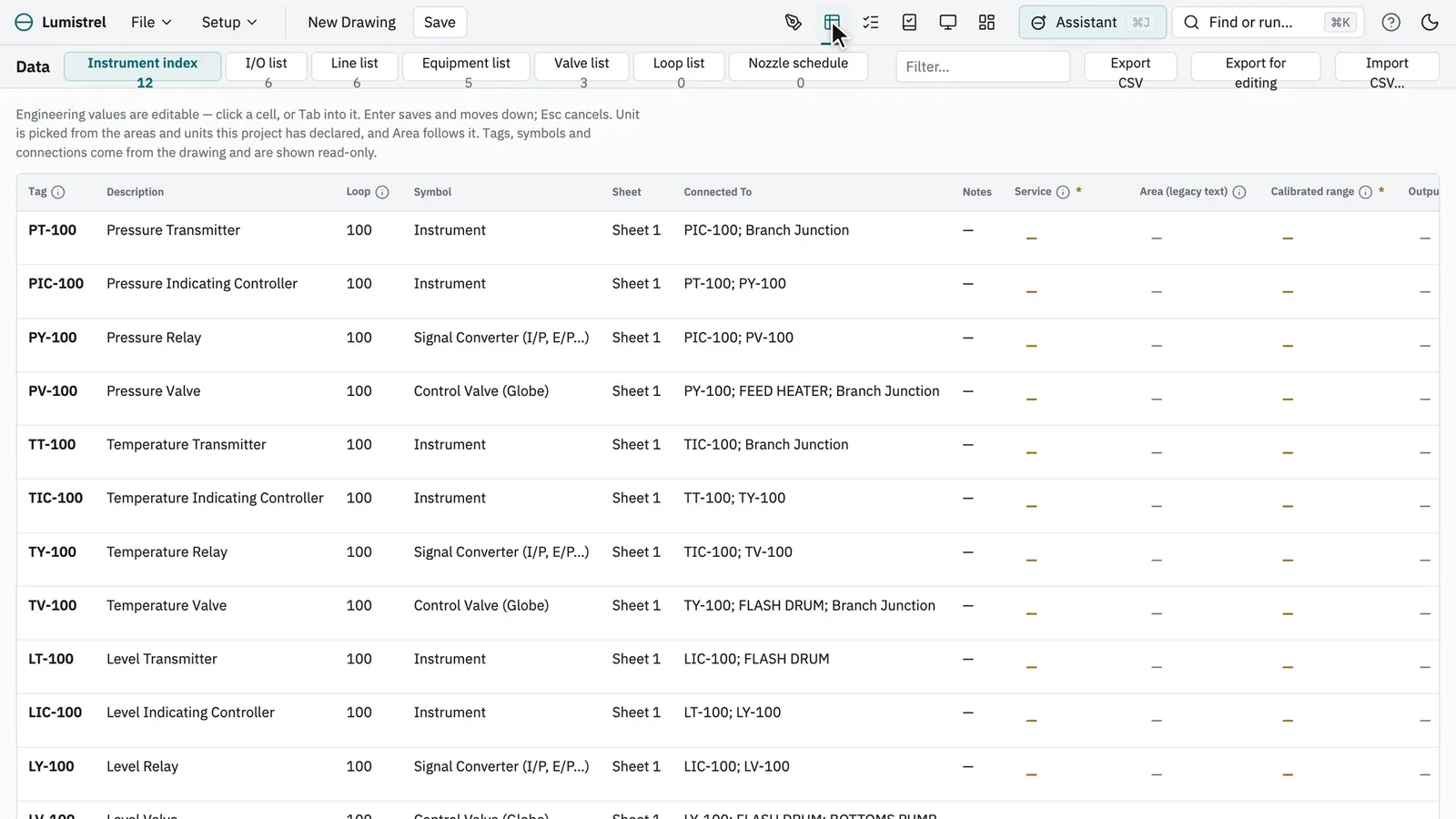
The instrument index, I/O, line, equipment and valve lists, read from what you drew, and checked the way a reviewer would.

engineering lists
7
73checks run
  • WarningPV-100 has no failure position (FC / FO / FL)
  • WarningFLASH DRUM has no relief device connected — intended?
  • WarningPT-100 is missing Service
The same plant’s instrument index in Lumistrel’s Data workspace

Operate

The operator screen

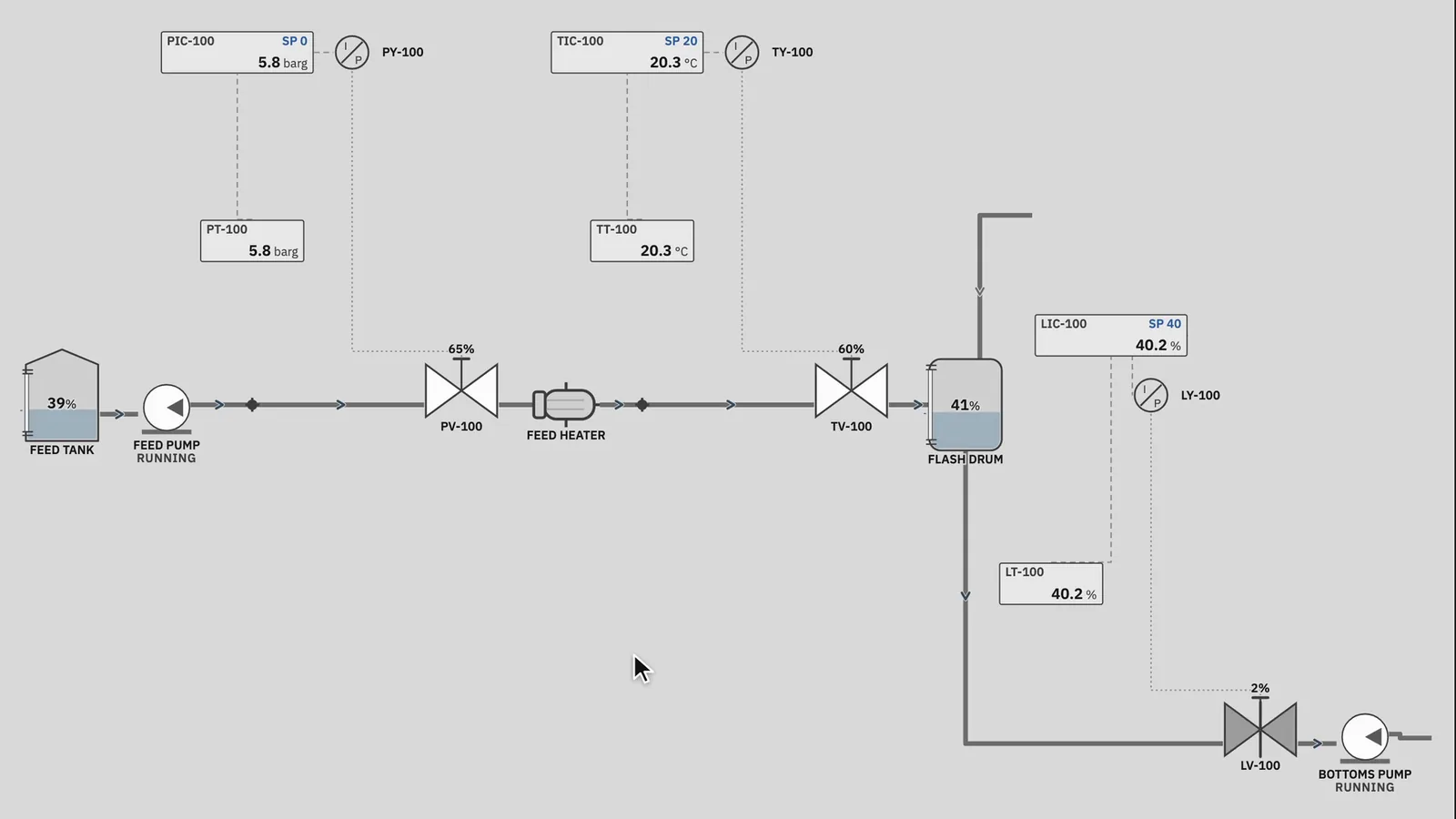
Built from the P&ID in one click, with faceplates, alarms and trends over a live hydraulic simulation.

LIC-100IllustrationSP 40 %LIC-100 HI
The same plant running as an operator screen in Lumistrel

One model

Put back together, it is one plant.

The lists are read from the drawing and the operator screen is built from it, so the instrument index never disagrees with the P&ID. Every deliverable leaves from the same model.

export formats
6
  • PDF
  • SVG
  • PNG
  • DXF
  • DEXPI
  • CSV

From an empty sheet to a running plant, in one take.

Recorded in the shipped editor, driven by a script with the pointer you see.

Watch each layer at work.

The same plant, drawn from an empty sheet, checked, and run. Each recording is the shipped editor, driven by a script with the pointer you see.

Draw

A full P&ID, drawn the way engineers draw

Drag equipment from the symbol library, drop in complete control loops, and connect it all port to port. Lines route themselves, tags are read against the ISA-5.1 letter tables, and every loop numbers itself.

  • Typical control loops in one click
  • Process, signal and impulse lines
  • Multi-sheet drawings with off-page links

Check

The lists and checks come from the drawing

The instrument index, I/O, line, equipment and valve lists are built from what you drew and edited in place. A rule engine flags what a reviewer would — a vessel with no relief, an incomplete record — before anyone else has to.

  • Engineering lists, editable, CSV in and out
  • Checks with severities you set
  • PDF, DXF, DEXPI and CSV export

Operate

Then run the plant as an operator would

One click turns the P&ID into an operator screen. Start the pumps from their faceplates, put loops in manual, and watch pressure, temperature and level respond in a live simulation — for design review and operator training.

  • Faceplates, alarms and trends
  • Hydraulic network simulation
  • ISA-101 high-performance theme

Everything in the editor today.

Every line here is in the editor you open. Work still being built is named in one place only, the last question of the FAQ.

Each group’s stack lights the layers it works on: the sheet, the lists, the operator screen.

The drawing

  • 195 ISA-5.1 symbols, and your own imported as SVG
  • 16 line classes, from process lines to data links
  • Typical control loops placed in one click
  • Multi-sheet drawings with off-page links
  • Notes, HOLDs and revision clouds for markup

Engineering data

  • Instrument index, I/O, line, equipment, loop, nozzle and valve lists
  • Edited in place, with CSV in and out
  • ISA-20-style instrument datasheets
  • ISA-5.4-style loop diagrams
73checks run

Checks

  • 73 engineering checks, with severities you set
  • Your company’s standards, held per project
  • Project health: completeness, quality and revisions
  • Review comments on any object

Operator screens

  • Operator screens built from the P&ID
  • A hydraulic network solve: flows, pressures, pump head
  • Faceplates, with PI and cascade control
  • Alarms with priorities and shelving, and trends
  • Upsets, malfunctions and exercises for training

In and out

  • PDF of one sheet or every sheet, SVG and PNG
  • Layered DXF that AutoCAD opens
  • DXF underlays to redraw over
  • DEXPI XML, out and in
  • CSV of every engineering list

Teams

  • Team projects with owner, engineer, reviewer and viewer roles
  • Check-out editing, so no one overwrites anyone
  • Review notes and markup on shared drawings
  • Signed revision approvals and an append-only audit trail

Needs a Lumistrel account.

When it cannot answer, it says so.

A solve that will not converge, a pump starved at its suction, a part of the plant with no pressure to work from: Lumistrel reports each one instead of showing a plausible number. In engineering, a confident wrong answer costs more than an honest gap.

ResidualIllustrationToleranceIterations
NO HYDRAULIC SOLUTION — mass is not balanced. Flows and pressures below are not readings.
The residual is an illustration of a solve that never reaches its tolerance. The banner is the operator screen’s own, word for word.
  • Runs in your browser

    Nothing to install. Chrome, Edge, Firefox or Safari on a laptop or desktop.

  • Keeps working offline

    Install it from the browser as an app, and drawing, checking and export carry on without a connection.

  • Your drawings stay yours

    Work autosaves in your browser. Save .pnid files to your own disk, or to your account’s cloud projects.

Built for the people who design, check and run plants.

  • Engineering and EPC firms

    Produce the P&ID and every list that hangs off it from one model, so the instrument index never disagrees with the drawing.

  • Skid and package builders

    Hand over tagged P&IDs, line lists and DEXPI files with every package, checked before they leave the shop.

  • Operations and training

    Turn the unit’s P&ID into a training simulator, and practise start-ups and alarm response away from the live control system.

  • Universities and colleges

    Teach ISA symbols, tagging and control loops on real engineering software, with the plant running in front of the class.

Drawn to the conventions your P&IDs are reviewed against.

  • ISA-5.1Symbols and tag lettersImplemented
  • ISA-5.4Loop diagramsImplemented
  • ISA-20Instrument datasheetsImplemented
  • ISA-101High-performance HMIImplemented
  • ISA-18.2Alarm managementImplemented
  • IEC 62682Alarm management, IECImplemented
  • DEXPIP&ID data exchangeDeveloping

Designed with these engineering standards and ecosystems in mind. Lumistrel has not been formally assessed or certified against any of them. Symbols are authored independently as original SVG from public-domain geometric conventions; this project is not affiliated with or endorsed by the International Society of Automation.

Questions, answered.

A few to start with; every question, answered has a page of its own. Something not covered there? Email contact@lumistrel.com.

Do I need to install anything?

No. Lumistrel runs in a desktop browser — Chrome, Edge, Firefox or Safari. You can also install it as an app from the browser, and it keeps working offline.

Where are my drawings kept?

Your work autosaves in your browser. You can save a drawing as a .pnid file on your own machine, or to your account’s cloud projects. Your drawings are always yours.

Can I open the drawings in AutoCAD?

Yes, through DXF: every sheet exports as a layered DXF that AutoCAD opens. DWG files cannot be imported directly — save one as DXF and load it as an underlay to redraw over.

Is Lumistrel certified against ISA standards?

No. It implements conventions from ISA-5.1, ISA-5.4, ISA-20, ISA-101 and ISA-18.2, but it has not been formally assessed or certified against any of them, and it is not affiliated with the International Society of Automation.

Can the simulation be used for operating decisions?

No. It represents process behaviour for engineering study and operator training. It is not a validated process simulator and does not replace a plant’s DCS or safety system.

Does it work on a phone or tablet?

You can read about it on any device, but drawing a P&ID needs a mouse and a desktop-sized window, so the editor is built for laptops and desktops.

What is coming next?

In development: fluid property model, DEXPI conformance hardening and custom HMI widgets from imported SVG. Further out, on the roadmap: automationML exchange, MTP / modular automation, APIs and plugins, real-time co-editing, SIS and cause & effect matrices, management of change and in-app DWG import.

See your own plant run.

Open the editor, draw a tank, a pump and a control loop, then build the operator screen and start the simulation. It takes a few minutes, in the browser you are using now.

Contact us
Lumistrel

Intelligent P&ID software for process and instrumentation engineers.

The name joins lumi, light, to the kestrel: the falcon that holds perfectly still in moving air, the way a well-run plant holds itself.

Lumistrel is desktop software

Drawing a P&ID takes a mouse and a desktop-sized window, so the editor is built for laptops and desktops. Look around here, then open it on your computer.